Best Cloud Storage for Photos 2025: Backup, Organize & Share Your Memories
⚠️ Affiliate Disclosure: CompareForge may earn a commission when you purchase through links on our site. This helps us keep our content free and up-to-date. We only recommend services we've thoroughly tested and believe provide genuine value. Learn more
In 2025, our smartphones capture thousands of precious memories—family gatherings, vacations, everyday moments—but relying solely on your phone's storage is risky. A lost, stolen, or damaged device can mean losing years of irreplaceable photos. Cloud storage for photos has become essential for protecting, organizing, and sharing your digital memories across all your devices.
The best photo cloud storage services go beyond simple backup. They offer intelligent organization with AI-powered search, automatic face recognition, collaborative albums for families, and seamless synchronization across smartphones, tablets, and computers. Whether you're a casual smartphone photographer or a professional with thousands of high-resolution images, choosing the right cloud storage can transform how you manage your photo library.
We've tested and compared the top cloud storage services for photos in 2025, evaluating storage capacity, pricing, photo-specific features, ease of use, and platform compatibility. This comprehensive guide will help you choose the perfect solution for backing up, organizing, and sharing your photos—whether you're an iPhone user, Android enthusiast, Amazon Prime member, or professional photographer.
📋 Table of Contents
☁️ Quick Comparison: Best Cloud Storage for Photos 2025
📸 Top 5 Cloud Storage Services for Photos - Detailed Reviews
1. Google Photos - Best Overall for Photos
Google Photos stands as the best overall cloud storage solution for photos in 2025, combining powerful AI-driven organization, generous free storage, and exceptional cross-platform compatibility. With 15GB of free storage shared across Gmail, Google Drive, and Google Photos, it offers one of the most generous free tiers available.
What sets Google Photos apart is its industry-leading AI search and organization. The service automatically recognizes faces, objects, locations, and even specific items like "birthday cake" or "sunset." You can search for "beach 2023" or "photos with mom" and instantly find relevant images without manual tagging. The automatic album creation groups photos by events, trips, and people, making organization effortless.
Google Photos excels at automatic backup from any device. Whether you're using Android, iPhone, Windows, or Mac, the app seamlessly uploads photos in the background. The service preserves original quality (counting against storage) or offers storage-saving compressed versions. Shared albums make it easy to collaborate with family and friends, and everyone can contribute photos to shared collections.
For users who exceed the 15GB free tier, Google One offers affordable upgrades: $1.99/month for 100GB, $2.99/month for 200GB, or $9.99/month for 2TB (which can be shared with up to 5 family members). The 2TB plan includes additional benefits like VPN access and Google Workspace premium features.
✅ Pros
- Best AI-powered search and organization
- 15GB free storage (most generous)
- Automatic face recognition and grouping
- Excellent cross-platform support
- Shared albums with collaboration
- Automatic photo enhancement tools
- Affordable paid plans ($1.99/mo for 100GB)
❌ Cons
- Storage shared with Gmail and Drive
- Privacy concerns (Google scans photos for AI)
- No longer offers unlimited compressed storage
- Requires Google account
Best For: Most users, Android users, families, anyone who values smart organization and powerful search over maximum privacy.
2. iCloud Photos - Best for Apple Users
iCloud Photos is the perfect choice for users invested in the Apple ecosystem, offering seamless integration with iPhone, iPad, Mac, and Apple TV. If you own multiple Apple devices, iCloud Photos provides the most effortless photo management experience available, with automatic synchronization that "just works."
The service stores your photos in original quality and syncs them across all your Apple devices instantly. Take a photo on your iPhone, and it appears on your iPad and Mac within seconds. iCloud Photos integrates deeply with the native Photos app on all Apple platforms, providing features like Memories, People albums, and intelligent search based on location, date, and content.
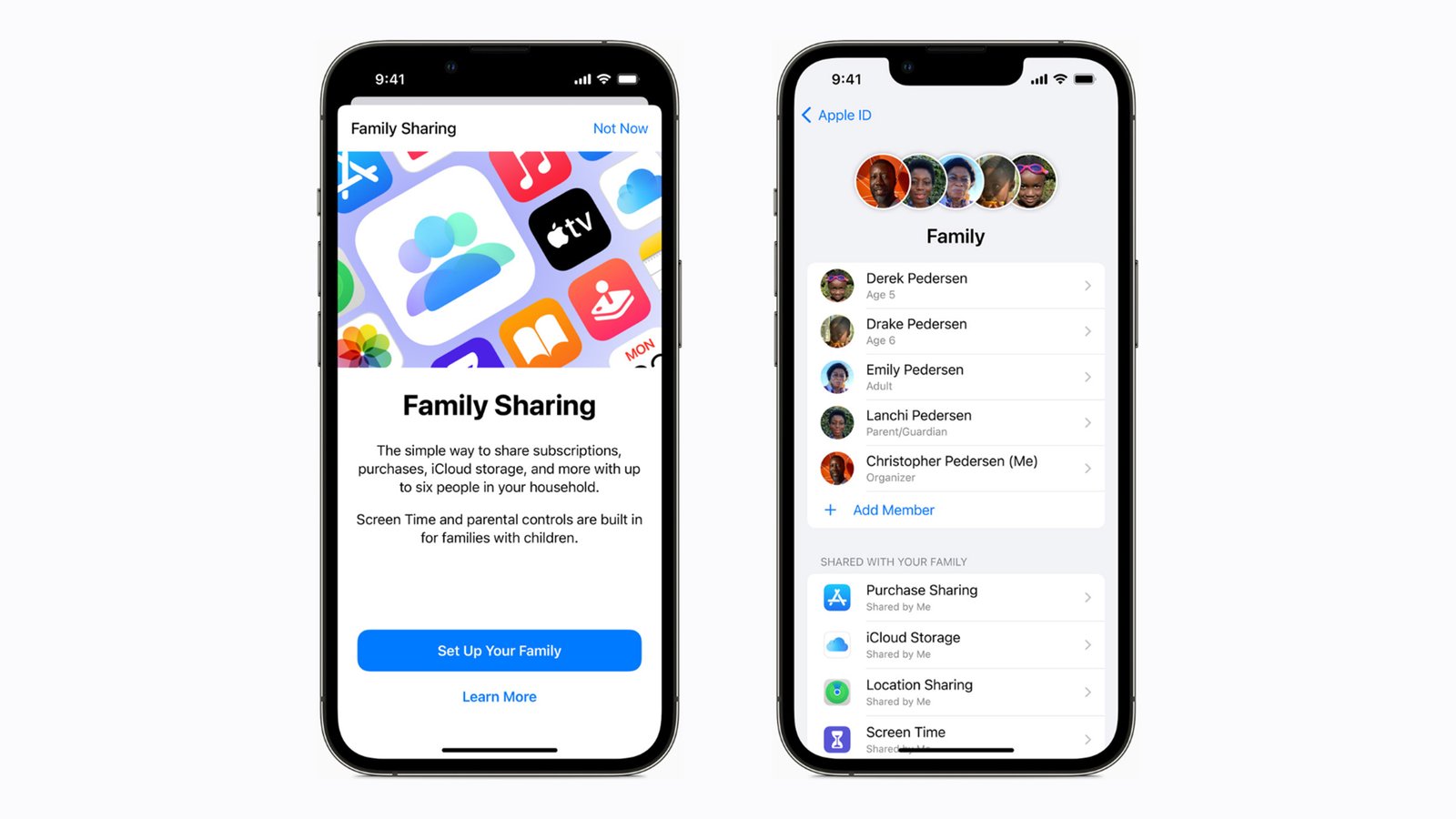
iCloud Family Sharing is a standout feature, allowing up to six family members to share a single storage plan while maintaining separate photo libraries. Shared Albums let families collaborate on photo collections, and everyone can add, comment, and like photos. The integration with iMessage makes sharing photos with Apple users incredibly simple.
While the free tier offers only 5GB, iCloud+ plans are competitively priced: $0.99/month for 50GB, $2.99/month for 200GB, or $9.99/month for 2TB. The 200GB and 2TB plans can be shared with family members. iCloud+ also includes additional features like iCloud Private Relay (VPN-like privacy), Hide My Email, and HomeKit Secure Video support.
✅ Pros
- Seamless Apple ecosystem integration
- Original quality photo storage
- Instant sync across all Apple devices
- Family Sharing with up to 6 members
- Shared Albums for collaboration
- Privacy-focused (end-to-end encryption option)
- Affordable 50GB plan ($0.99/mo)
❌ Cons
- Only 5GB free storage
- Requires Apple devices for best experience
- Limited web interface functionality
- Storage shared with device backups
- Less advanced AI search than Google Photos
Best For: iPhone, iPad, and Mac users who want seamless synchronization and tight ecosystem integration. Families using Apple devices.
3. Amazon Photos - Best for Prime Members
Amazon Photos offers an unbeatable value proposition for Amazon Prime members: unlimited full-resolution photo storage at no additional cost beyond your Prime membership ($139/year or $14.99/month). This makes it the most cost-effective solution for users who already subscribe to Prime for shipping and streaming benefits.
Unlike Google Photos' compressed storage option, Amazon Photos stores all your images in original, full resolution without any quality loss or file size limits. You can upload RAW files from professional cameras, high-resolution smartphone photos, and even scanned images without worrying about compression artifacts. The service also includes 5GB of video storage, with additional storage available through paid plans.
Amazon Photos includes Family Vault, allowing up to five family members to share the unlimited photo storage and collaborate on shared albums. The service offers automatic backup from mobile devices, facial recognition for organizing photos by people, and AI-powered search for finding photos by content, location, or date. The desktop app provides bulk upload capabilities for transferring large photo libraries.
The service works across all platforms with apps for iOS, Android, Windows, Mac, and web access. Amazon Photos integrates with Amazon Echo Show and Fire TV devices, allowing you to display your photos on smart displays and TVs. For non-Prime members, Amazon Photos offers 5GB of free storage with paid plans starting at $1.99/month for 100GB.
✅ Pros
- Unlimited full-resolution photo storage (Prime)
- No compression or quality loss
- Included with Prime membership
- Family Vault for up to 5 members
- RAW file support for photographers
- Integration with Echo Show and Fire TV
- Cross-platform apps (iOS, Android, desktop)
❌ Cons
- Requires Prime membership ($139/year)
- Only 5GB video storage (photos unlimited)
- Less advanced AI features than Google Photos
- Interface not as polished as competitors
- Limited editing tools
Best For: Amazon Prime members, photographers who need unlimited full-resolution storage, families who share a Prime membership.
4. Dropbox - Best for Professional Photographers
Dropbox excels as a professional-grade cloud storage solution with excellent file management capabilities and robust photo organization features. While not exclusively designed for photos like Google Photos or iCloud, Dropbox's Camera Upload feature automatically backs up photos from your mobile devices, and its superior file organization makes it ideal for professional photographers and creative professionals.
Dropbox stores photos in their original quality and provides powerful file management tools including advanced search, file versioning (restore previous versions), and selective sync (choose which folders to sync to each device). The desktop app creates a seamless folder on your computer that automatically syncs with the cloud, making it easy to organize large photo libraries with your preferred file structure.
For collaboration, Dropbox offers shared folders and file requests, allowing clients to upload photos directly to your Dropbox without needing an account. The service integrates with professional tools like Adobe Creative Cloud, making it popular among photographers and designers. Dropbox Paper provides collaborative workspaces for organizing photo projects with notes and feedback.
Dropbox's pricing is higher than competitors: the free tier offers only 2GB, while paid plans start at $11.99/month for 2TB (Plus plan) or $19.99/month for 3TB with the Family plan (up to 6 users). Professional plans offer 3TB+ with advanced features. The higher cost reflects Dropbox's focus on professional users and businesses rather than casual photo backup.
✅ Pros
- Excellent file management and organization
- Camera Upload automatic backup
- File versioning and recovery
- Professional collaboration tools
- Adobe Creative Cloud integration
- Selective sync for large libraries
- Shared folders and file requests
❌ Cons
- Expensive compared to competitors
- Only 2GB free storage
- Not photo-specific (general file storage)
- Limited AI-powered photo organization
- No facial recognition or smart search
Best For: Professional photographers, creative professionals, users who need advanced file management and collaboration tools.
5. Microsoft OneDrive - Best for Windows Users
Microsoft OneDrive is the ideal choice for Windows users and Microsoft 365 subscribers, offering deep integration with Windows 11, Office apps, and the broader Microsoft ecosystem. The service provides automatic Camera Roll backup from mobile devices and seamless synchronization with the OneDrive folder built into Windows.
OneDrive's standout value comes from its inclusion with Microsoft 365 subscriptions ($6.99/month or $69.99/year for Personal, $9.99/month or $99.99/year for Family). These plans include 1TB of OneDrive storage per user (up to 6 users for Family), plus full access to Office apps (Word, Excel, PowerPoint, Outlook) on desktop and mobile. For users who already need Office, this makes OneDrive an exceptional value.
The service offers automatic photo organization by date and location, basic AI-powered search, and the ability to create shared albums. OneDrive's integration with Windows Photos app provides a familiar interface for Windows users. The Personal Vault feature adds an extra layer of security for sensitive photos with biometric authentication and automatic locking.
For standalone storage without Office, OneDrive offers 5GB free, with paid plans at $1.99/month for 100GB or $6.99/month for 1TB (with Office 365). The service works across Windows, Mac, iOS, Android, and web browsers, though the experience is optimized for Microsoft platforms.
✅ Pros
- Excellent value with Office 365 (1TB + Office)
- Deep Windows 11 integration
- Camera Roll automatic backup
- Personal Vault for sensitive photos
- Cross-platform support
- Family plan (6 users, 6TB total)
- Offline access to files
❌ Cons
- Basic photo-specific features
- AI search less advanced than Google Photos
- No facial recognition
- Storage shared with Office documents
- Best value requires Office 365 subscription
Best For: Windows users, Microsoft 365 subscribers, families who use Office apps and need cloud storage.
🔍 What to Look For in Photo Cloud Storage
Choosing the right cloud storage for your photos requires evaluating several key factors beyond just storage capacity and price. The best service for you depends on your device ecosystem, photo volume, organization needs, and privacy preferences. Here are the essential features to consider:
✅ Storage Capacity and Pricing
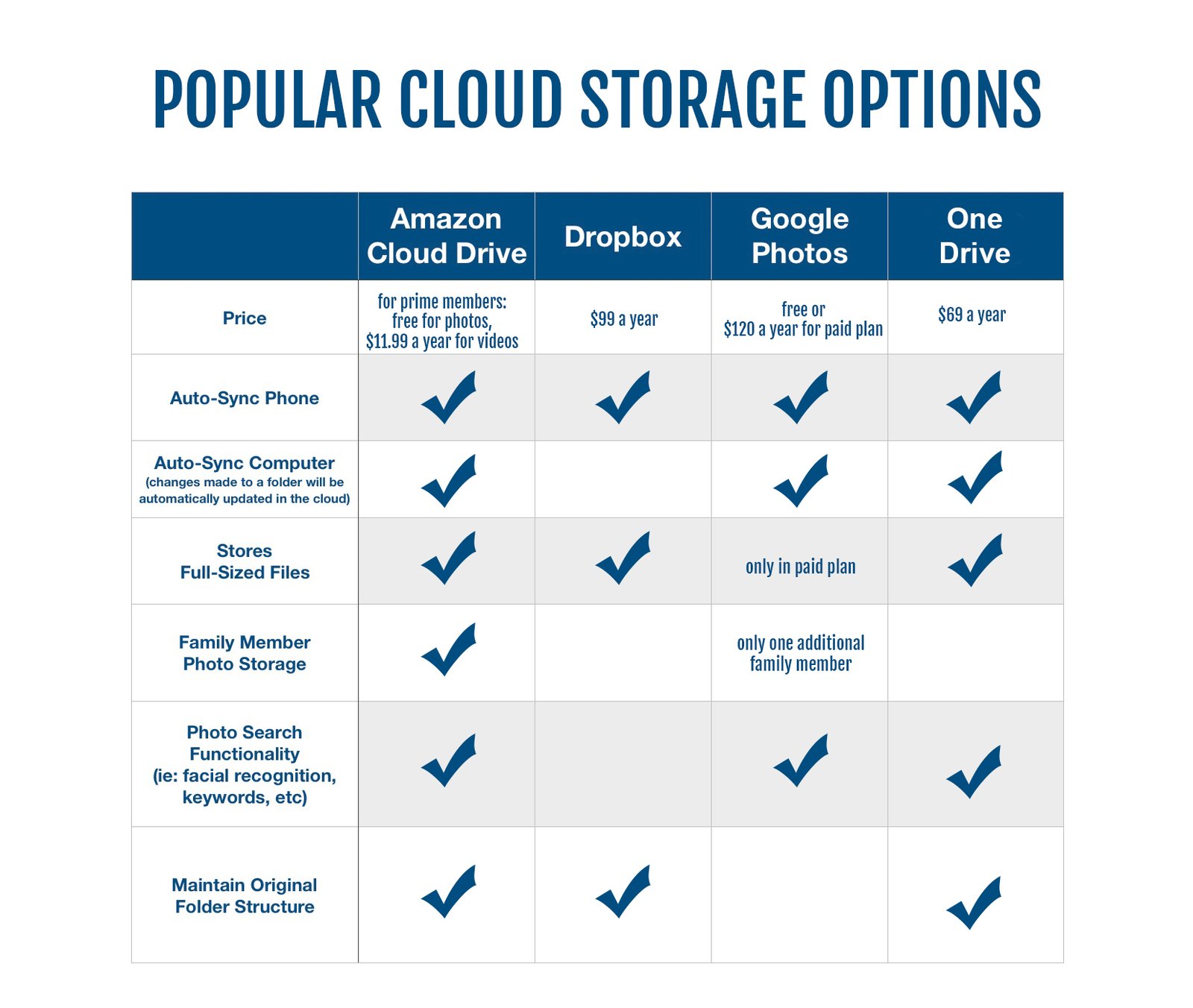
Evaluate both free storage and paid plan pricing. Most users need 100-200GB for photos. Consider whether storage is dedicated to photos or shared with other data (email, documents). Amazon Photos offers unlimited photos for Prime members, while Google Photos provides 15GB free shared storage.
✅ Original Quality vs Compression
Determine if the service stores photos in original quality or compresses them. iCloud, Amazon Photos, and Dropbox preserve original quality. Google Photos offers both options—original quality (counts against storage) or storage-saving compressed versions. Photographers should prioritize original quality and RAW file support.
✅ Automatic Backup and Sync
The best photo storage automatically backs up new photos from your smartphone without manual intervention. Look for services that offer background upload, WiFi-only options to save data, and the ability to backup from multiple devices. All major services offer automatic backup, but implementation quality varies.
✅ Organization and Search Features
AI-powered organization is crucial for large photo libraries. Google Photos leads with advanced search by objects, text, people, and locations. iCloud offers good organization with Memories and People albums. Consider whether you prefer automatic organization (Google Photos) or manual folder structures (Dropbox).
✅ Sharing and Collaboration
Evaluate sharing capabilities for families and friends. Shared albums allow multiple people to contribute photos. Google Photos and iCloud excel at collaborative albums. Consider whether you need public sharing links, password protection, or download permissions for shared content.
✅ Family Sharing Options
Family plans allow multiple users to share storage while maintaining separate photo libraries. iCloud Family Sharing (up to 6 members), Google One Family (up to 5 members), and Amazon Photos Family Vault (up to 5 members) offer excellent value for families. Check if family members can access each other's photos or just share storage capacity.
✅ Cross-Platform Support
Ensure the service works on all your devices. Google Photos and Amazon Photos offer excellent cross-platform support (iOS, Android, Windows, Mac, web). iCloud works best within the Apple ecosystem but offers limited Windows and web access. Dropbox and OneDrive provide good cross-platform compatibility.
✅ Privacy and Security
Consider privacy implications. Google scans photos for AI features, which some users find concerning. iCloud offers end-to-end encryption for Advanced Data Protection. All services use encryption in transit and at rest. Enable two-factor authentication and review privacy settings regardless of which service you choose.
💡 How to Choose the Right Cloud Storage for Your Photos
The best cloud storage for photos depends on your specific needs, device ecosystem, and budget. Here's our recommendation guide based on different user profiles:
🍎 iPhone/iPad/Mac Users
Choose iCloud Photos. The seamless integration with Apple devices, instant sync, and family sharing make it the obvious choice. Start with the 50GB plan ($0.99/mo) or 200GB ($2.99/mo) for families.
📱 Android Users
Choose Google Photos. Best AI organization, generous 15GB free storage, and perfect integration with Android. The free tier is sufficient for many users; upgrade to 100GB ($1.99/mo) if needed.
📦 Amazon Prime Members
Choose Amazon Photos. Unlimited full-resolution photo storage included with Prime is unbeatable value. Perfect if you already have Prime for shipping and streaming.
📷 Professional Photographers
Choose Dropbox or Google Photos (paid). Dropbox offers superior file management and collaboration tools. Google Photos 2TB plan provides excellent organization with ample storage for RAW files.
👨👩👧👦 Families
Choose iCloud Family or Google One Family. Both offer family sharing with separate libraries. iCloud ($2.99/mo for 200GB) for Apple families; Google One ($9.99/mo for 2TB) for mixed or Android families.
💰 Budget-Conscious Users
Choose Google Photos free tier. 15GB free storage is the most generous. Combine with Amazon Photos (if you have Prime) or iCloud for redundancy without paying.
⚙️ How to Set Up Automatic Photo Backup
Setting up automatic photo backup ensures your memories are protected without manual effort. Here's how to enable automatic backup on the most popular services:
📱 iOS (iPhone/iPad) - iCloud Photos
- Open Settings > tap your name at the top
- Tap iCloud > Photos
- Enable iCloud Photos toggle
- Choose "Optimize iPhone Storage" (saves space) or "Download and Keep Originals"
- Photos will automatically upload when connected to WiFi
🤖 Android - Google Photos
- Install Google Photos app from Play Store
- Open the app and sign in with your Google account
- Tap your profile picture > Photos settings > Backup
- Enable Backup & sync
- Choose upload size: "Original quality" or "Storage saver" (compressed)
- Select "Back up using mobile data" if desired (uses cellular data)
💻 Desktop - All Services
Google Photos (Desktop Uploader):
- Download Google Photos desktop app from photos.google.com/apps
- Install and sign in with your Google account
- Select folders to back up (e.g., Pictures, Desktop)
- Choose upload quality and enable automatic backup
iCloud Photos (Mac/Windows):
- Mac: Open System Settings > Apple ID > iCloud > enable Photos
- Windows: Download iCloud for Windows, install, and enable iCloud Photos
- Photos in designated folders automatically sync
Amazon Photos (Desktop):
- Download Amazon Photos desktop app
- Sign in with your Amazon account
- Select folders to automatically back up
- Enable automatic upload for new photos
❓ Frequently Asked Questions
Which cloud storage is best for photos?
Google Photos is the best overall cloud storage for photos in 2025, offering excellent AI-powered organization, automatic backup, and generous free storage (15GB). For Apple users, iCloud Photos provides seamless integration. Amazon Prime members get unlimited full-resolution photo storage with Amazon Photos.
Is Google Photos still free in 2025?
Yes, Google Photos offers 15GB of free storage shared with Gmail and Google Drive. After reaching the limit, you can upgrade to Google One: $1.99/month for 100GB, $2.99/month for 200GB, or $9.99/month for 2TB. The free tier no longer includes unlimited high-quality storage as it did before June 2021.
What's better: Google Photos or iCloud?
Google Photos excels in AI-powered search, organization, and cross-platform compatibility. iCloud Photos is better for Apple users, offering seamless integration with iPhone, iPad, and Mac. Google Photos has better free storage (15GB vs 5GB) and superior search features, while iCloud provides tighter ecosystem integration and family sharing.
How much cloud storage do I need for photos?
Most users need 100-200GB for photos. A typical iPhone photo is 2-5MB, so 100GB holds approximately 20,000-50,000 photos. Heavy shooters or professional photographers may need 1-2TB. Consider your current photo library size and growth rate when choosing a plan.
Can I use multiple cloud storage services for photos?
Yes, you can use multiple services simultaneously for redundancy. Many users combine Google Photos for organization and search with iCloud or Amazon Photos for backup. This provides extra protection against data loss and takes advantage of each service's strengths.
Is my data safe in cloud storage?
Major cloud storage providers (Google, Apple, Amazon, Microsoft, Dropbox) use enterprise-grade encryption and security measures. Photos are encrypted in transit and at rest. However, consider enabling two-factor authentication and reviewing privacy settings. For maximum privacy, use end-to-end encrypted services.
How do I transfer photos between cloud services?
You can transfer photos using Google Takeout (for Google Photos), iCloud.com download, or third-party tools like MultCloud. Download your photos from the source service, then upload to the destination. Most services offer bulk download and upload options. Allow several hours for large libraries.
What happens if I stop paying for cloud storage?
If you stop paying, you'll revert to the free tier. Your photos remain accessible but you can't upload new ones if over the limit. Google Photos and iCloud give you time to download or delete files. Your data won't be immediately deleted, but services may eventually remove files after extended non-payment.
🏁 Final Verdict: Best Cloud Storage for Photos 2025
After extensive testing and comparison, Google Photos emerges as the best overall cloud storage for photos in 2025. Its combination of generous free storage (15GB), industry-leading AI organization, powerful search capabilities, and cross-platform compatibility make it the top choice for most users. The automatic backup, face recognition, and shared albums provide a complete photo management solution.
For Apple users, iCloud Photos offers unmatched seamless integration with iPhone, iPad, and Mac. The instant sync and family sharing features make it the obvious choice within the Apple ecosystem. Amazon Prime members should absolutely use Amazon Photos for unlimited full-resolution storage—it's an incredible value included with your membership.
Professional photographers will appreciate Dropbox's superior file management and collaboration tools, while Windows users and Microsoft 365 subscribers get excellent value with OneDrive. Whichever service you choose, the most important step is to enable automatic backup today—protecting your irreplaceable memories is worth the small investment in cloud storage.